I accidently set my default application for PDF to OpenOffice, it was a royal pain, you know where..:)
After googling, I came across many articles which explained how to setup a default application, but none of them explained how to change it.
Here is a simple way to change it. You may already know this, however this is for someone who gets stuck and doesn’t know how to change this.
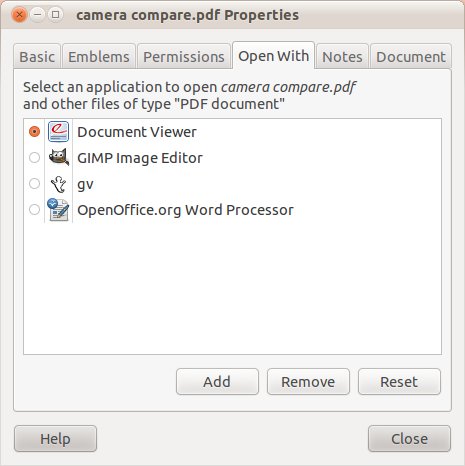
Right click on the file, that you want you want to change the association.
Select Properties-Open With and change the default application.
i m using ubuntu linux .i have proble: when i select any drive from places then by default it opens in movie player ,now tell me how could i change the setting for open with.
please
I have the same problem. did you get it resolved ?
Figured out how to get something other than movie player to be launched when a DVD is inserted in a drive. To change it do the following:
1. If needed make File Manager Preferences show under the control center. Default on my system is for it not to be shown. Can make it show by selecting Main Menu from the control center, then select system->preference->file management.
2. From the control center double click on Personal->File Management.
4. Under the media tab, use DVD Video: to select a different action.