I compared the hardware requirements of a popular Linux Desktop: Ubuntu 9.10 with Windows 7Â both of which were released last month.
| Hardware | Windows 7 | Ubuntu 9.10 |
| RAM (MB) | 1024 MB | 256 MB |
| Processor (MHz) | 1000 MHz | 300 MHz |
| Disk Space (MB) | 16 GB | 4 GB |
Ubuntu 9.10 remained a modest 265MB memory with 300MHz computer. Also Ubuntu can run on lesser hardware as well, if you have 128MB Memory, you can still use Xbuntu (a variant), or if you have 64 MB you can use LTSP and run Ubuntu off a central server.
Now Windows 7 demands 1GB Memory with 1GHz computer.
While Windows 7 required 16GB of space to install, Ubuntu can be installed on on less than 4 GB of space.
Some people may argue that hardware is getting cheaper by the day, however there are millions of PCs around in the world which won’t be able to run Windows without an upgrade. If the use Ubuntu, they will save on upgrade costs and hurt the environment less by not having to throw away their old computer.
Some interesting findings: Ubuntu’s hardware requirements has not changed in the last 8 releases over the last 4 years.
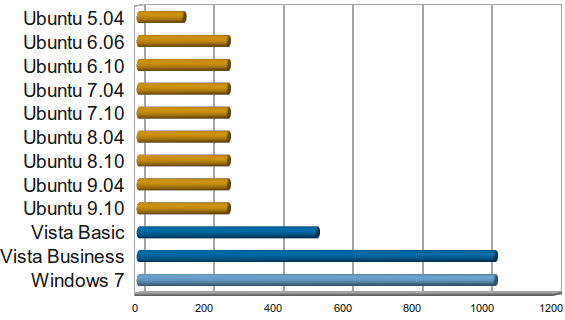
Even thought Vista Basic claimed that it requires 512MB RAM and Vista Business claimed 1GB. Both crawled on 1GB of RAM and required 2GB to run effectively with 15GB of disk space.
Sources:
Ubuntu Release Notes
Windows 7 System requirements.
Windows Vista System requirements.
Prakash,
Correct me if I am wrong, but Ubuntu 9.10 doesn’t run properly on 256MB RAM. 512MB is the recommended from my side if something productive needs to be done.
Windows knows how to market their OS pretty good. They claim it’s a faster OS then XP and Vista. Ya for sure slap on a QUAD Core processor with 6 gigs of ram and any OS will be super fast. And windows is still based on NTFS a 10 year old filesystem. So I really don’t see an advantage of using windows 7!
Did you actually try to install and run Ubuntu on a 256MB RAM machine with a 300MHz processor?
Minimal Requirements are not even that IMHO.
i installed 9.10 on a 933MHZ pentium3 with 512 mb of ram and a agp2x gforce 4 (64MB) at 1680×1050 and it ran flawlessly, compiz (with propie. drivers) and everything worked fine. The efects ovbiously didnt run SMOOOOOOTH but they were fast enought to be usable.
Ram usage was high and used some swap (compcache only) but never slowed some much that bothered me
What are the units for the x-axis of your Operating System comparison graph?
Is it MHz for processor clock speeds?
Is it MB for how much RAM used?
MHz is the processor speed recommended by the Operating System vendor.
MB is how much RAM is recommended by the Operating System Vendor
The units on the X-axis of that graph are MB of RAM.
ok, last Ubuntu for me was 9.04 which ran “ok” but was sluggish on my Dual core 1.8GHz processor with 481 MB RAM,
well now I use Debian from past 6 months.. which is just efficient, fast and in short.. awesome!
Ubuntu for me is “bloated”, but is it bloat to have all the “nice bling”?.. depends on the person’s opinion..
Anyways Windows 7 wouldn’t even run on such low ram!!
GNU/Linux FTW!
Two things. One is that you’ve actually quoted the Windows 7 /minimum/ system requirements. According to https://help.ubuntu.com/10.10/installation-guide/i386/minimum-hardware-reqts.html the /minimum/ RAM for Ubuntu – which is the appropriate statistic to compare, after all – is in fact 64MB.
Second is that, according to the same page, the recommended amount of RAM for Ubuntu Maverick is 512MB, rather than 256. It is interesting that the official installation guide should disagree with the release notes. Note that this is still less than the minimum for Windows Seven.
Linux is Great.
URGENT Pls
———-
I want to switch from windows to free open software
Just please guide me which one to use – Ubuntu or Debian or Linux on my netbook (pls assume current models / specifications)
Which is easiest to switch to, which is more user friendly for novices, which has most drivers for various peripherals, which is faster
Pls guide about the choice among above or even a different alternative
Regards